Tampilkan postingan dengan label v2. Tampilkan semua postingan

Selasa, 25 Februari 2014

RAM Booster Pro v2 0 APK

The most beautiful part of this app is a small, configurable widget that places on top of any app and one-click to RAM boost.
Recommended by AddictiveTips.
Hotest Apps by AppBrain.

Most of Android devices bundle with limited memory. Android task manager will selectively kill low priority tasks in order to reserve memory to higher priority task. That’s not always run at an appropriate time, causing low responsive apps, lagging, especially when you launch a new app after heavily browsing web pages. It causes a worse experience.

How RAM Booster works

  • RAM Booster is designed to overcome these issues by selectively kill less important apps that are running in the background but consumes considerable device’s memory.
RAM Booster comes with auto-boost in 4 levels: aggressive, strong, medium, gentle.
  • Aggressive: kill most of low priority apps
  • Strong: Kill apps that is low priority as well as consume lightly below an “average”
  • Medium: kill apps that consumes memory above an “average”
  • Gentle: kill only apps that uses considerable memory
“Average” is evaluated real-time based on running apps and change over time.

How to work RAM Booster

There are 5 ways to boost
  1. Auto-boost: boost automatically under RAM available & timing conditions
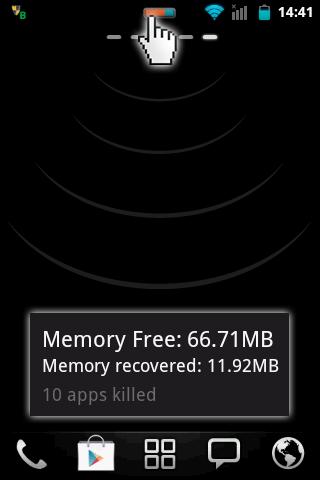
  2. Overlay widget – Enable RAM Booster overlay widget (on by default), adjust widget’s position, and tap on widget to boost anytime you want
  3. Home screen widget – one tap to boost (long-press your home screen>Widget to add RAM Booster widget)
  4. Notification bar – one tap to boost (toggle notification bar visibility in app’s setting)
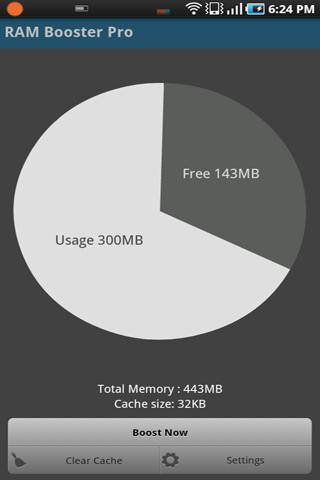
  5. Boost Now – tap this button from app’s main screen
Tool:
  • 1-click cache cleaner
There are plenty options from app’s settings to twist boosting process:
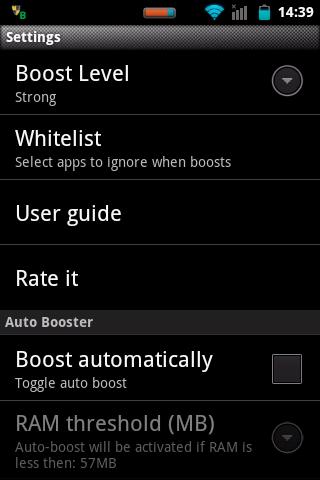
  • Boost level: select a boost level
  • Nice themes at your choice
  • Whitelist apps: apps will not be killed when boosting
  • Boost automatically: auto-boost, come with minimal RAM threshold and Boost interval
  • Report style- define how to show reports
  • Feedback- a haptic feedback when touch on boost widget
  • Overlay widget position/size - Change overlay widget position/size
  • Overlay widget transparency- Change transparent/opaque level
  • OnClick/OnLongClick options for overlay widget
Whats in this version : (Updated : Nov 5, 2013)
  • Fixed minor bugs
Required Android O/S : 2.1+

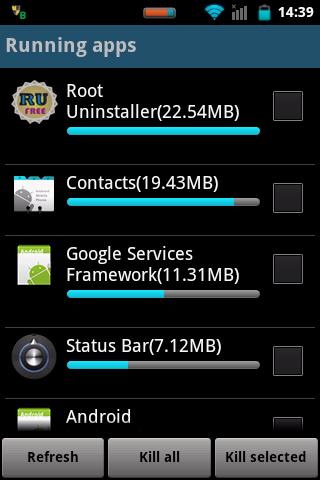
Screenshots :


Download : 1.3Mb APK
Read More..

Rabu, 29 Januari 2014

SightSpace 3D v2 0 2 Apk Android

SightSpace 3D Apk Software for Android powerful, accurate, and impactful tool to communicate Trimble SketchUp designs and visualize any space! SightSpace 3D is a fast and easy visualization tool for Trimble SketchUp that easily conveys your designs and reduces miscommunication. With advanced 3D and Augmented Reality technologies, pre-visualize buildings, materials, fixtures, and more to effectively communicate scale and context. Check for errors during construction and close deals faster with Augmented Reality to display digital models in the real world. Utilize bookmarks, annotations, photos, and social media to simplify presentations. A SightSpace Pro subscription plan expands functionality for a complete SketchUp-to-Field experience with the addition of external GPS and markers for Augmented Reality, photo markups, model dimensions, and more.

Screenshot

Requires Android 2.2 and Up

Features
  • Open SketchUp files directly from your device, Dropbox, email, or Trimble 3D Warehouse – includes native SketchUp files (.SKP), Google Earth and other .KMZ and .KML formats
  • SightSpace is the only mobile app that uses native SketchUp (.SKP) files to preserve model privacy – No uploading/downloading from a website or extra software required.
VIEW
  • Use intuitive multi-touch controls including orbit, pan, and zoom to navigate your model
  • Communicate context, scale, and location information with advanced Augmented Reality
SHARE
Share annotations, photos, screenshots, and more to colleagues via email or social networking
A SightSpace Pro subscription enables features including:
  • Connect external GPS for precise Augmented Reality location
  • Create and use markers for Augmented Reality presentations
  • Play bookmarks as animations
  • Markup photos with drawings and text
  • Export all notes to PDF
  • Display model dimensions created in SketchUp

More Info

Download

Read More..